
Follow the steps below exactly in the order given.
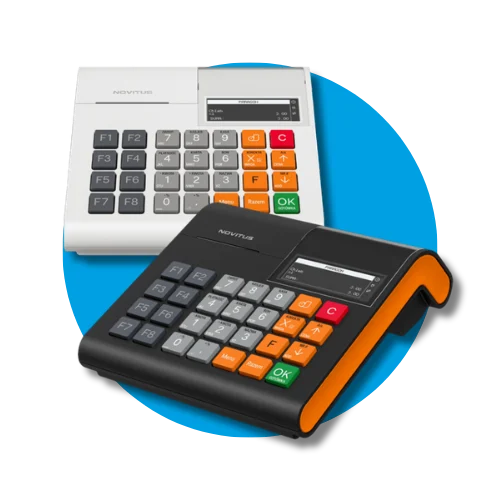
Turn on the cash register. Once the register starts up, type 4515220 on the keypad.
Open connection settings. Press the red F key, then press the Razem key.
Select quick settings. When "szybkie ustawienia" appears on the screen, press Razem.
If prompted: "wyczyścić obecną konfigurację WLAN", press Razem.
Select your Wi-Fi network. A list of available Wi-Fi networks will appear. Use the UP/DOWN arrows to find your network. The arrows are located on the Cena and Kod keys.
Confirm network selection. When your Wi-Fi network name appears on the screen, press Razem.
Confirm again. The network name will appear again. Press Razem once more.
Enter Wi-Fi password. When "hasło" and asterisks appear, enter your Wi-Fi network password. To enter a letter or number, press the corresponding key repeatedly until the correct character appears.
Uppercase letters. If the password contains UPPERCASE LETTERS, press the red F + Cena keys simultaneously. You can then enter uppercase letters. To return to lowercase letters, press F + Cena again.
Confirm password. After typing the entire Wi-Fi password, press Razem.
Finish setup. When the register asks "dodać kolejne konfigurację WLAN", press the red C key.
Wait for connection. The cash register will return to the home screen. Wait until the Wi-Fi icon appears in the top right corner of the screen.
If the register still does not connect. Repeat the procedure from step 2. Also check if the Wi-Fi password was entered accurately, taking into account UPPERCASE and lowercase letters as well as digits.
IMPORTANT
The cash register is configured to connect to the Internet via Wi-Fi. The Wi-Fi password must be entered accurately, paying attention to UPPERCASE and lowercase letters and digits.